


[XG WORLD TOUR: THE CORE] ALPHAZ ANNUAL PREMIUM/STANDARD・MONTHLY Paid Members VIP SEAT (STAND) Upgrade (Lottery) Application Details
Applications for VIP SEAT (STANDARD) upgrades (lottery) for all paid ALPHAZ ANNUAL PREMIUM/STANDARD and MONTHLY members will begin from 3:00 PM on Friday, January 9th to 11:59 PM on Monday, January 12th! Details on how to apply will be announced below.
*This offer is available to those who have won/paid for tickets with all reserved seats (including accompanying persons) through the "ALPHAZ ANNUAL PREMIUM/STANDARD Members Fastest Ticket Pre-sale (Lottery) Reception" and "ALPHAZ ANNUAL PREMIUM/STANDARD・MONTHLY All Paid Members Ticket Pre-sale (Lottery) Reception."
== ...

== ...
◇Performance information
XG WORLD TOUR: THE CORE
■ Venue: K Arena Yokohama
▽Performance date: Friday, February 6, 2026
Open 17:30 / Start 19:00
■ Venue: K Arena Yokohama
▽Performance date: Saturday, February 7, 2026
Open 15:30 / Start 17:00
■ Venue: K Arena Yokohama
▽Performance date: Sunday, February 8, 2026
Open 15:30 / Start 17:00
■ Venue: Osaka Castle Hall
▽Performance date: Tuesday, February 17, 2026
OPEN 18:00 / START 19:00
■ Venue: Osaka Castle Hall
▽Performance date: Wednesday, February 18, 2026
OPEN 18:00 / START 19:00
■ Venue: IG Arena
▽Performance date: Saturday, February 21, 2026
Open 17:30 / Start 19:00
■ Venue: IG Arena
▽Performance date: Sunday, February 22, 2026
Open 15:30 / Start 17:00
■Venue: Sundome Fukui
▽Performance date: Saturday, March 14, 2026
OPEN 16:00 / START 17:00
■ Venue: Miyagi Sekisui Heim Super Arena
▽Performance date: Friday, March 20, 2026
OPEN 16:00 / START 17:00
■ Venue: GLION ARENA KOBE
▽Performance date: Wednesday, March 25, 2026
OPEN 18:00 / START 19:00
■ Venue: GLION ARENA KOBE
▽Performance date: Thursday, March 26, 2026
OPEN 18:00 / START 19:00
*Door opening and performance start times are subject to change.
*Due to the venue specifications and the fact that the Sandome Fukui and Kitakyushu Messe performances do not have stand seats, there will be no VIP seats (stand).
== ...
■Ticket prices
<VIP SEAT>
25,000 yen (tax included)
*Upgrades (lottery) will be accepted from those who have purchased reserved seats.
*System fees will be charged separately.
*Benefits: VIP SEAT (STAND) guaranteed
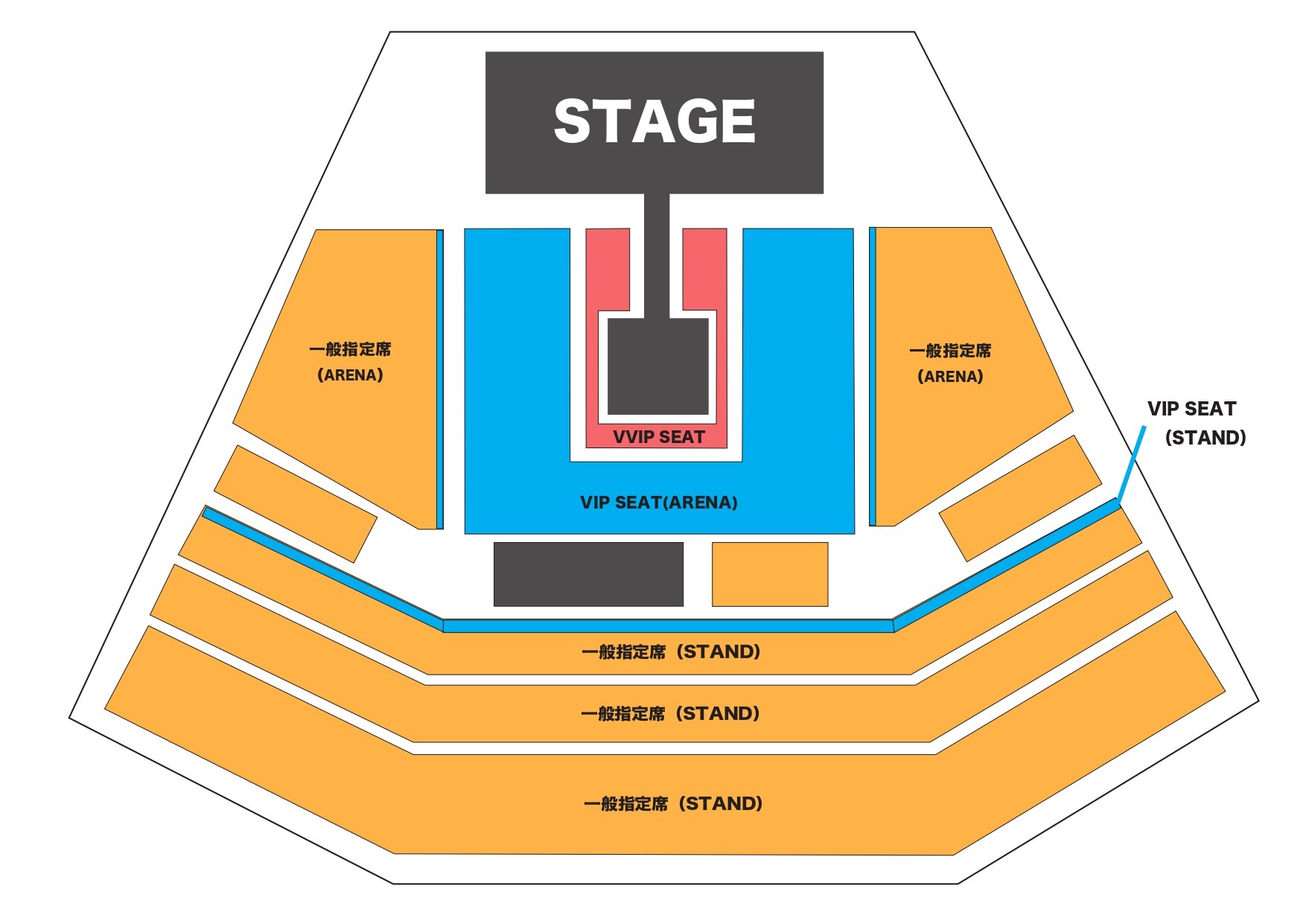
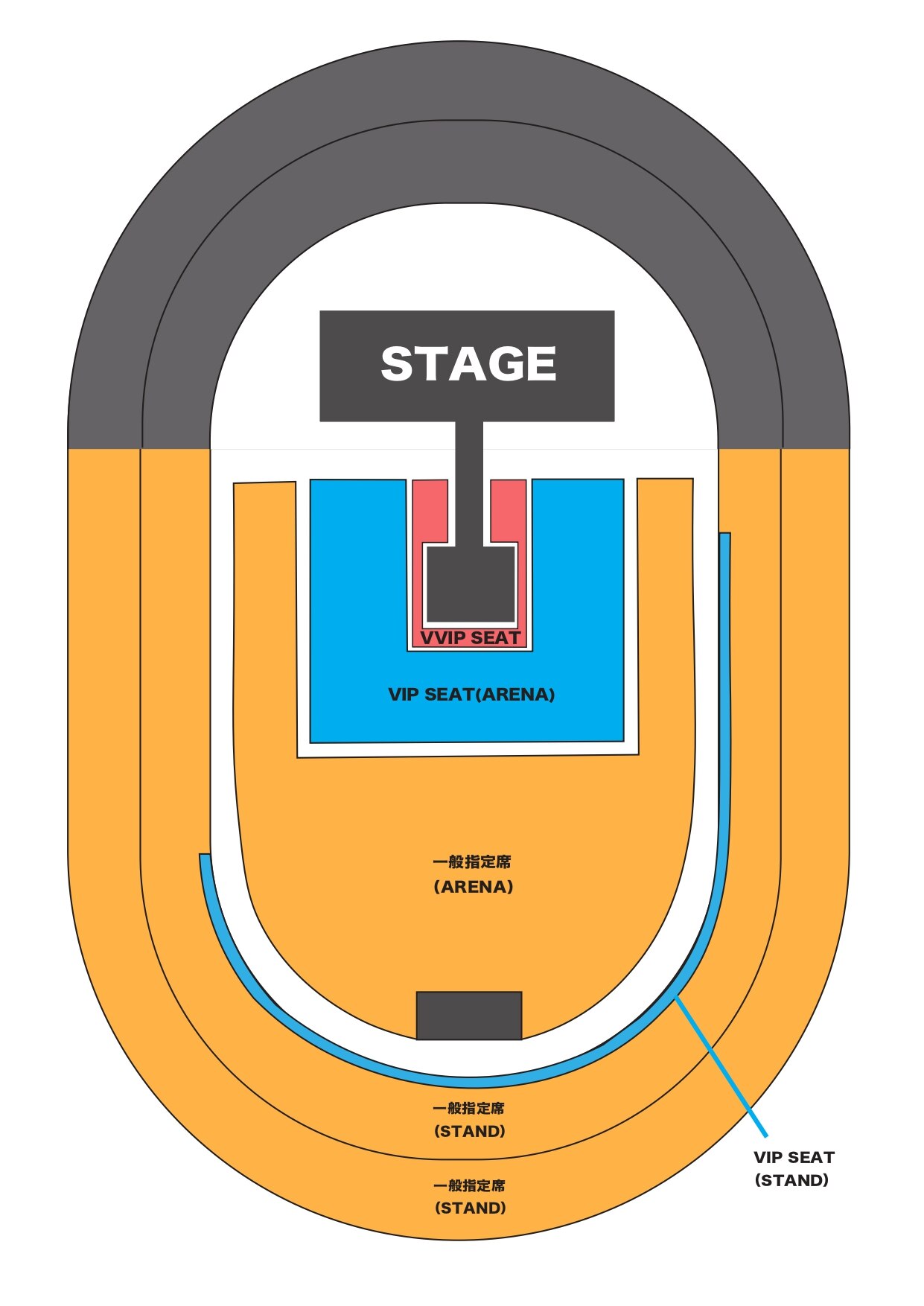
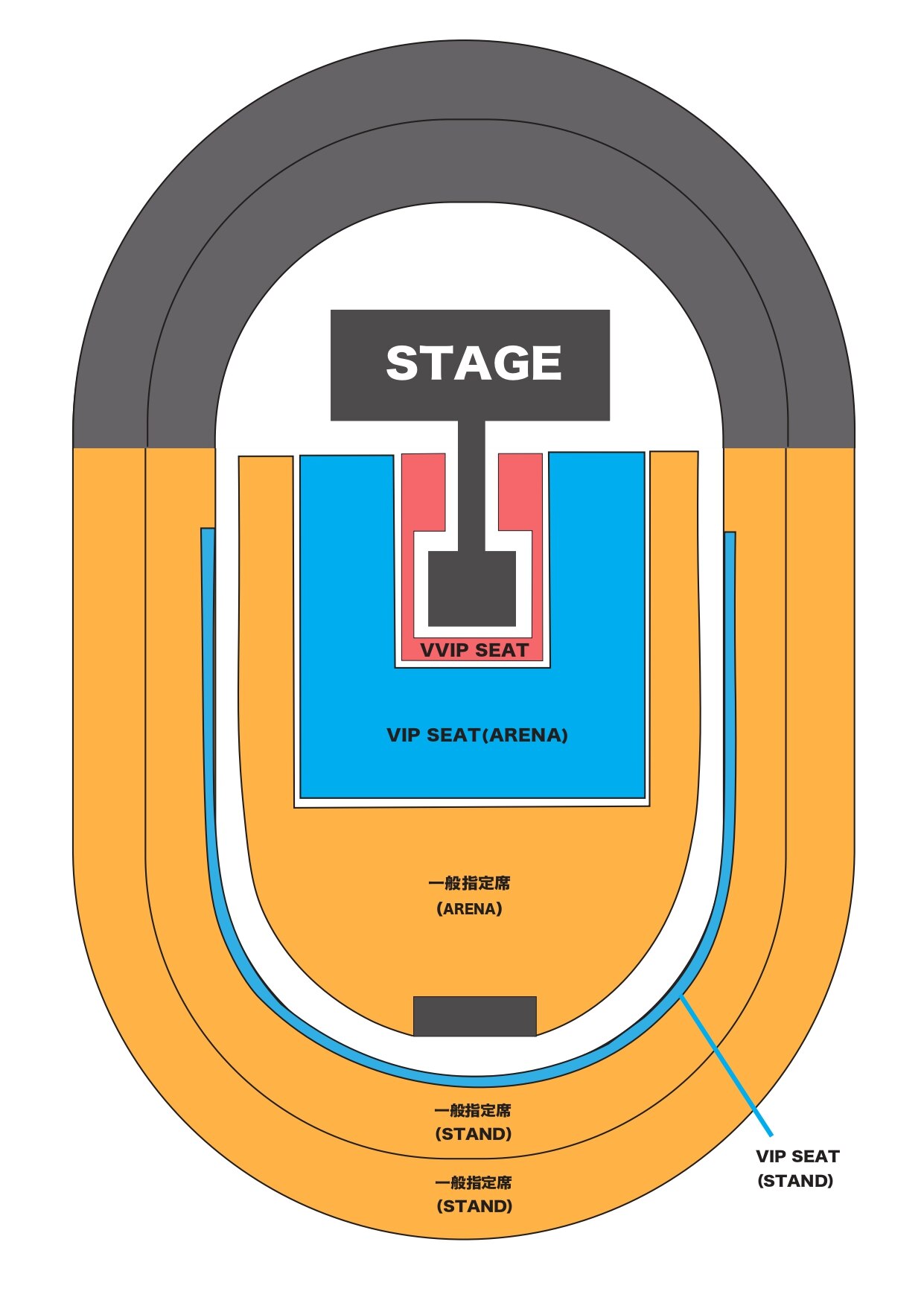
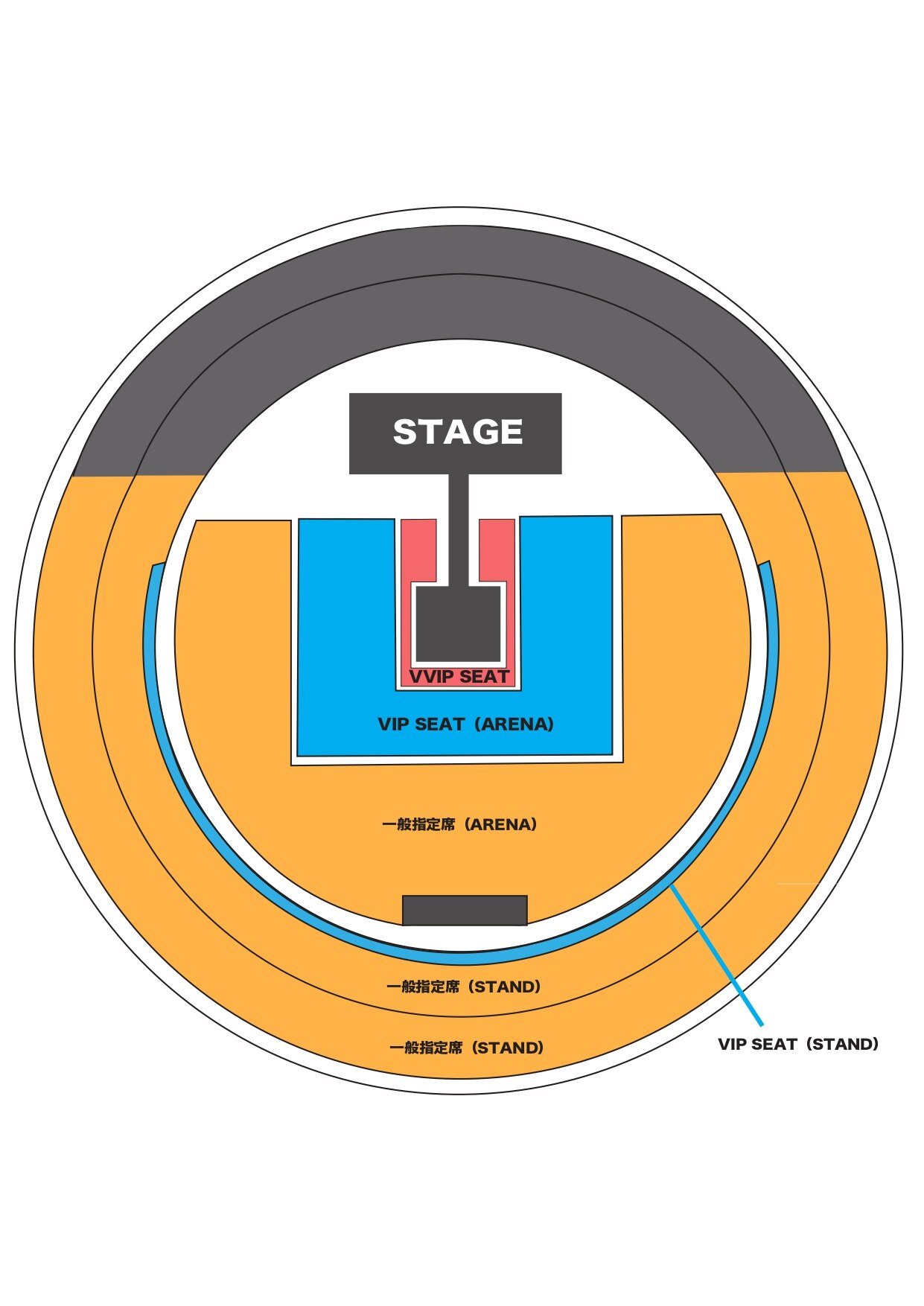
■ Seat layout image
<K Arena Yokohama>
<Osaka Castle Hall>
IG Arena
<Sandome Fukui>
<Miyagi Sekisui Heim Super Arena>

GLION ARENA KOBE
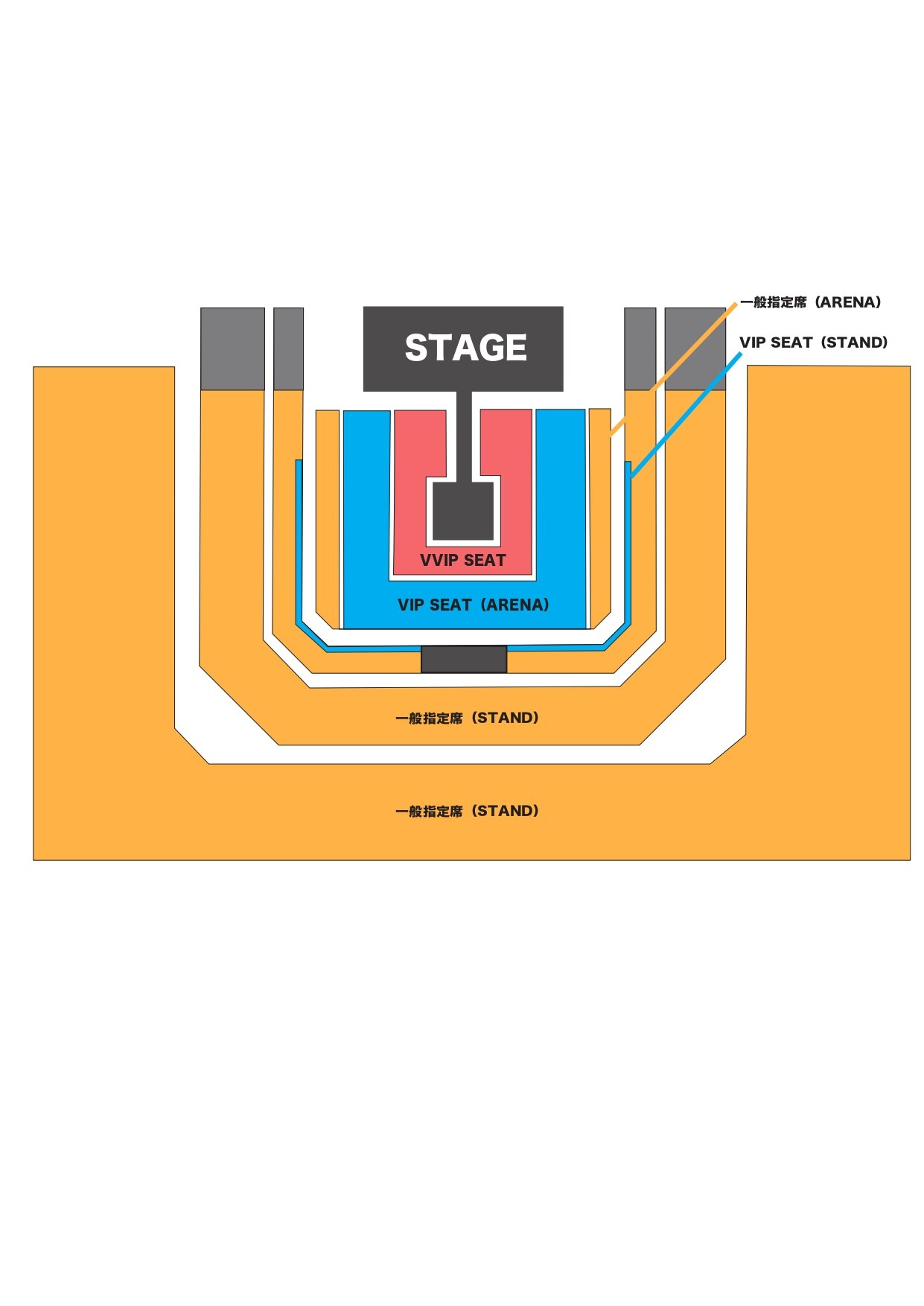
*This is an image of the seating layout as of January 9, 2026.
*Please note that the stage plan, venue layout, and seating arrangement may change without notice.
*Please note that we will not be able to offer refunds or transfers due to the above changes.
---------------------------------------------------------
[Alphaz Annual Premium/Standard/Monthly Paid Member VIP Seat (Standard) Upgrade (Lottery) Application Period]
January 9, 2026 (Friday) 15:00 to January 12, 2026 (Monday) 23:59
*The link to the application site is in the [How to Apply] section below.
---------------------------------------------------------
[Winning confirmation and payment period]
Friday, January 16, 2026 15:00
*Payment can only be made by credit card or PayPay.
[Applicants]
*This offer is available to those who have won/paid for tickets with all reserved seats (including accompanying persons) through the "ALPHAZ ANNUAL PREMIUM/STANDARD Members Fastest Ticket Pre-sale (Lottery) Reception" and "ALPHAZ ANNUAL PREMIUM/STANDARD・MONTHLY All Paid Members Ticket Pre-sale (Lottery) Reception."
*Tickets are not available on a first-come, first-served basis. We expect heavy traffic due to high access numbers, especially immediately after the start and end of sales. Please apply well in advance during the sales period.
*Please carefully read the details, including the notes listed on the application site, before proceeding.
[How to apply]
①Log in to the application status confirmation page
Application status confirmation page https://member2.y-tickets.jp/order_auth/authenticate/
*To log in, you will need the application number, date of birth, and phone number you entered when applying for the "ALPHAZ ANNUAL PREMIUM/STANDARD Members Fastest Advance Ticket (Lottery) Application" and "ALPHAZ ANNUAL PREMIUM/STANDARD・MONTHLY All Paid Members Advance Ticket (Lottery) Application."
Even if you enter the "application number" used when applying for the upgrade lottery, the details of your application will not be displayed. Therefore, please be sure to enter the information you used when you originally applied for the "ALPHAZ ANNUAL PREMIUM/STANDARD Members Fastest Advance Ticket (Lottery) Application" or "ALPHAZ ANNUAL PREMIUM/STANDARD・MONTHLY All Paid Members Advance Ticket (Lottery) Application."
②Click the "Apply for upgrade" button displayed in your purchase history and follow the instructions on the screen to apply.
*Please note that the application button will not be displayed until 3:00 PM on Friday, January 9, 2026.
*Please note that if there are no performances available for upgrade, the "Apply for upgrade" button will not be displayed.
[Notes on VIP SEAT (STAND) upgrade lottery reservations]
*Upgrade lottery applications can only be made for the number of tickets purchased at the "ALPHAZ ANNUAL PREMIUM/STANDARD Members Fastest Advance Ticket (Lottery) Application" and "ALPHAZ ANNUAL PREMIUM/STANDARD・MONTHLY All Paid Members Advance Ticket (Lottery) Application." It is not possible to upgrade only a portion of the tickets.
*Those who have been selected through the "ALPHAZ ANNUAL PREMIUM/STANDARD Member Ticket Fastest Advance (Lottery) Reception" and "ALPHAZ ANNUAL PREMIUM/STANDARD・MONTHLY All Paid Member Ticket Advance (Lottery) Reception" can apply for the upgrade lottery for each advance ticket.
*VIP SEAT (STAND) is an upgrade from reserved seats, and if you apply for/are selected through the upgrade lottery, you will be charged the difference in price between the upgraded ticket and your current ticket, which is 10,000 yen (tax included).
*If you wish to change your application details, please cancel and reapply.
*Only performances that are eligible for an upgrade will be displayed.
*The application status and lottery results for upgrade lottery reservations can be confirmed on the application status confirmation page (https://member2.y-tickets.jp/order_auth/authenticate/) for more information.
*To log in, you will need the application number, date of birth, and phone number you entered when applying for the "ALPHAZ ANNUAL PREMIUM/STANDARD Members Fastest Advance Ticket (Lottery) Application" and "ALPHAZ ANNUAL PREMIUM/STANDARD・MONTHLY All Paid Members Advance Ticket (Lottery) Application."
Even if you enter the "application number" used when applying for the upgrade lottery, the details of your application will not be displayed. Therefore, please be sure to enter the information you used when you originally applied for the "ALPHAZ ANNUAL PREMIUM/STANDARD Members Fastest Advance Ticket (Lottery) Application" or "ALPHAZ ANNUAL PREMIUM/STANDARD・MONTHLY All Paid Members Advance Ticket (Lottery) Application."
*If you have not made your payment within the period after winning the "ALPHAZ ANNUAL PREMIUM/STANDARD Member Ticket Fastest Pre-sale (Lottery) Application" or "ALPHAZ ANNUAL PREMIUM/STANDARD・MONTHLY All Paid Member Ticket Pre-sale (Lottery) Application" or if you have purchased tickets through other pre-sale methods, the application button will not be displayed on the application status confirmation page. Please be sure to check your own application and winning status before using this page.
*You will need to apply for both the all reserved seats and the VIP SEAT (STAND) in two separate applications, but if you are selected and paid for the upgrade, the ticket will be displayed as one "All reserved seats (VIP SEAT STAND)" ticket when it is issued.
*If you are not selected in the VIP SEAT (STAND) upgrade lottery, all seats will be reserved.
*Wheelchair users can also apply for upgrades at the respective reception desks, but if you are selected, due to limited space in each area, you will need to move from your wheelchair to your designated seat to watch the show. Please note that these are not designated seating areas.
*Please note that if the organizers determine that viewing from a particular area is difficult, you may be guided to a special space for people with disabilities (shared by all tickets). Please note that seats cannot be changed after the performance has started.
== ...
■Number limit
VIP SEAT (STAND): Up to 6 tickets per application
(Up to 5 guests per ANNUAL PREMIUM/STANDARD/MONTHLY member, including ANNUAL PREMIUM/STANDARD/MONTHLY members and non-members)
*You can only apply for the number of tickets you have purchased through the "ALPHAZ ANNUAL PREMIUM/STANDARD Members Fastest Advance Ticket (Lottery) Reception" and "ALPHAZ ANNUAL PREMIUM/STANDARD・MONTHLY All Paid Members Advance Ticket (Lottery) Reception." You cannot upgrade only a portion of your tickets.
■Other notes
*All dates and times above are in Japan/Korea time.
*Children under 3 years old are not allowed to enter, and children aged 3 and over will be charged.
*Performing members may be subject to change. In such cases, no refunds will be given.
*Please note that tickets for performances cannot be cancelled, changed or refunded after purchase, regardless of the reason.
*Resale for commercial purposes is prohibited
== ...
■Ticket issuance and admission
To receive your ticket and enter the venue, you will need a smartphone that is compatible with the smartphone app "ALPHAZ."
*Please make sure that you and your companions download the ALPHAZ app.
*Although this is a fan club app, downloading, registering, and using purchased tickets are free of charge.
After purchasing your ticket, please complete steps 1 to 6 below in advance before coming to the venue.
If you have not completed the necessary procedures, it may take some time before you can enter the venue.
Please be sure to check the following before coming and complete the necessary procedures.
1. Download the "ALPHAZ" app
To receive your digital ticket, you will need to download the smartphone app "ALPHAZ." Please download the app from the link below.
[iPhone users] App Store
https://apps.apple.com/us/app/xg-official-fanclub-alphaz/id1597302854
[Android users] Google Play
https://play.google.com/store/apps/details?id=fan.pasch.xgalx&referrer=utm_source%3Dlp%26utm_medium%3Dbannar%26utm_campaign%3Dregular&pli=1
■Supported OS
iPhone: iOS 14 or later
Android: Android 7.0 or later (excluding some models)
2. Log in to the "ALPHAZ" app
An XGALX ID is required to use the ALPHAZ app and TICKET function.
If you do not have an XGALX ID, please create one by clicking "New Registration (Free)" on the ALPHAZ app login screen or by clicking "New Registration (Free)" in the menu at the top right of the ALPHAZ website.
After that, log in using the XGALX ID you created by going to "Login" in the ALPHAZ app.
If you already have an XGALX ID, please log in using your XGALX ID from the "Login" section of the ALPHAZ app.
*If you have not logged in to the app since August 2025, please see here.
Starting in August 2025, the ID used to log in to ALPHAZ has been changed from +ID to XGALX.
If you have a +ID, you can continue to use your account by migrating it to an XGALX ID.
Please click on "If you have not yet completed the migration to your XGALX ID, click here" at the bottom of the login screen to complete the process.
Please note that if you do not have an XGALX ID, click here to register.
3. TICKET function registration
After logging in to the ALPHAZ app, you must first register to use the TICKET function. Please follow the steps below to register.
[User registration procedure]
①Click "TICKET" from the menu.
②Enter the information on the basic information entry screen for TICKET and press the confirm button.
③ Follow the instructions on the screen to verify your phone number.
④When the registration completion screen appears, press the "Back" button.
⑤When the MY EVENT screen appears, your registration is complete.
*Please be sure to register using the device with the phone number you registered as the mobile phone number for receiving tickets when purchasing your ticket.
*Tickets will not be displayed if they are before the event display start date (ticket issuance start date).
Please complete steps 4 to 6 below after the event display start date (ticket issuance start date).
Once ticket issuance begins, we will send an email to the email address you registered when you applied to inform you that ticket issuance has begun.
4. Pick up your ticket
After the event display start date and time (ticket issuance start date and time), please follow the steps below to collect your tickets.
[Ticket collection procedure]
①Click "TICKET" from the menu.
② If you have registered the same mobile phone number as the one you used to receive your tickets when you purchased them, the RECEIVE screen will be displayed.
③Press "Confirm" on the RECEIVE (ticket receipt) screen.
④ Check the ticket details and press "Receive ticket."
⑤ When the message "Ticket received" is displayed, receipt is complete.
*If you have not registered, please follow the instructions on the screen to register (enter basic information for TICKET and verify your phone number).
*This will only be displayed if there are tickets available for collection at the registered phone number.
*Please note that if the phone number registered when purchasing the ticket is different from the phone number authenticated in the ALPHAZ app, the ticket cannot be issued.
*Tickets issued before the event display start date (ticket issuance start date) cannot be viewed on the app.
5. Ticket Distribution
Each person will be required to purchase one ticket for this performance. If you have purchased two or more tickets, please follow the steps below to distribute the tickets to your companions.
[Ticket distribution procedure]
①Click "TICKET" from the menu.
②Select the event you want to give tickets to from MY EVENT.
③Click on "Ticket Details" for the ticket you want to give.
④ Press "Give ticket."
5. Click either "Email," "SMS," or "Copy URL." Pressing either button will launch an application with the transfer URL, or the URL will be copied.
⑥Please send the URL without deleting it. If you have copied the URL, please paste it into any messaging app and send it to your companion.
⑦The message on the ticket will change to "Requesting collection."
⑧Once your companion has collected their ticket, their name will be displayed on the ticket.
*Please note that tickets purchased by the purchaser cannot be distributed or transferred.
*Accompanying persons will also need to download and register for ALPHAZ.
*If you arrive without having received your tickets, it may take some time before you can enter.
Please make sure to distribute your tickets and have your companions download the ALPHAZ app and collect their tickets before arriving.
6. How to enter on the day of the event
QR code authentication will be required at the entrance to the venue. Click "TICKET" from the menu of the ALPHAZ app, display the QR code from the QR tab or "Display admission QR code" on the ticket screen, and proceed to the entrance.
*You cannot participate in the event using a screenshot of the QR code or a screen capture.
*For this performance, each person will be required to display a QR code to enter.
*If both you and your companions have not completed steps 1 to 4, it may take some time before you can enter. Please be sure to collect and distribute your tickets before arriving at the venue.
*The entrance will be very crowded just before the performance begins. You may not be able to enter in time for the performance to begin, so please arrive early and allow yourself plenty of time.
*If the latest QR code is not displayed because your smartphone is offline, authentication may not be possible. In that case, click the update button in an online environment to display the latest QR code.
ALPHAZ Digital Ticket Information
Business hours: Weekdays 13:00-17:00
Contact form
https://xg-digital-ticket.pasch.fan/form/input/
== ...
★Important points to note when visiting★
・During the performance, please either stand or sit in your seat. Leaving your seat, running forward, leaning forward, and other actions are prohibited.
*Please note that tickets for performances cannot be cancelled, changed or refunded after purchase, regardless of the reason.
■Initiatives for this performance■
●Smoking areas within the venue will be closed after the performance.
●Bringing alcoholic beverages or entering while under the influence of alcohol is prohibited.
●If you are pregnant, suspect you may be pregnant, have a chronic or underlying illness, or have difficulty traveling alone, please consider your own safety and the safety of those around you first and make your own decision before attending.
●We do not accept gifts, celebratory flowers, flower stands, etc. for performers. Please note that we will not accept gifts delivered to the venue or handed directly to the members or staff.
●Please post your fan letters in the dedicated fan letter box located inside the venue.
■Other notes
*All dates and times above are in Japan/Korea time.
We will do our best to ensure that everyone can visit the venue in safety, so we appreciate your understanding and cooperation.
---------------------------------------------------------
■Inquiries regarding ALPHAZ
XG OFFICIAL FANCLUB ALPHAZ
https://xg.pasch.fan/
■Inquiries regarding ticket applications
FAQ "Frequently Asked Questions"
https://info2.y-tickets.jp/info/faq/
■Ticket Office
Business hours: Weekdays 13:00-17:00
Contact form
https://info2.y-tickets.jp/inquiry/input
■Inquiries regarding the ALPHAZ app's "TICKET function"
(Inquiries regarding ticket issuance and distribution procedures)
ALPHAZ Digital Ticket Information
Business hours: Weekdays 13:00-17:00
Contact form
https://xg-digital-ticket.pasch.fan/form/input/
---------------------------------------------------------
*This offer is available to those who have won/paid for tickets with all reserved seats (including accompanying persons) through the "ALPHAZ ANNUAL PREMIUM/STANDARD Members Fastest Ticket Pre-sale (Lottery) Reception" and "ALPHAZ ANNUAL PREMIUM/STANDARD・MONTHLY All Paid Members Ticket Pre-sale (Lottery) Reception."
== ...
== ...
◇Performance information
XG WORLD TOUR: THE CORE
■ Venue: K Arena Yokohama
▽Performance date: Friday, February 6, 2026
Open 17:30 / Start 19:00
■ Venue: K Arena Yokohama
▽Performance date: Saturday, February 7, 2026
Open 15:30 / Start 17:00
■ Venue: K Arena Yokohama
▽Performance date: Sunday, February 8, 2026
Open 15:30 / Start 17:00
■ Venue: Osaka Castle Hall
▽Performance date: Tuesday, February 17, 2026
OPEN 18:00 / START 19:00
■ Venue: Osaka Castle Hall
▽Performance date: Wednesday, February 18, 2026
OPEN 18:00 / START 19:00
■ Venue: IG Arena
▽Performance date: Saturday, February 21, 2026
Open 17:30 / Start 19:00
■ Venue: IG Arena
▽Performance date: Sunday, February 22, 2026
Open 15:30 / Start 17:00
■Venue: Sundome Fukui
▽Performance date: Saturday, March 14, 2026
OPEN 16:00 / START 17:00
■ Venue: Miyagi Sekisui Heim Super Arena
▽Performance date: Friday, March 20, 2026
OPEN 16:00 / START 17:00
■ Venue: GLION ARENA KOBE
▽Performance date: Wednesday, March 25, 2026
OPEN 18:00 / START 19:00
■ Venue: GLION ARENA KOBE
▽Performance date: Thursday, March 26, 2026
OPEN 18:00 / START 19:00
*Door opening and performance start times are subject to change.
*Due to the venue specifications and the fact that the Sandome Fukui and Kitakyushu Messe performances do not have stand seats, there will be no VIP seats (stand).
== ...
■Ticket prices
<VIP SEAT>
25,000 yen (tax included)
*Upgrades (lottery) will be accepted from those who have purchased reserved seats.
*System fees will be charged separately.
*Benefits: VIP SEAT (STAND) guaranteed
■ Seat layout image
<K Arena Yokohama>
<Osaka Castle Hall>
IG Arena
<Sandome Fukui>
<Miyagi Sekisui Heim Super Arena>
GLION ARENA KOBE
*This is an image of the seating layout as of January 9, 2026.
*Please note that the stage plan, venue layout, and seating arrangement may change without notice.
*Please note that we will not be able to offer refunds or transfers due to the above changes.
---------------------------------------------------------
[Alphaz Annual Premium/Standard/Monthly Paid Member VIP Seat (Standard) Upgrade (Lottery) Application Period]
January 9, 2026 (Friday) 15:00 to January 12, 2026 (Monday) 23:59
*The link to the application site is in the [How to Apply] section below.
---------------------------------------------------------
[Winning confirmation and payment period]
Friday, January 16, 2026 15:00
*Payment can only be made by credit card or PayPay.
[Applicants]
*This offer is available to those who have won/paid for tickets with all reserved seats (including accompanying persons) through the "ALPHAZ ANNUAL PREMIUM/STANDARD Members Fastest Ticket Pre-sale (Lottery) Reception" and "ALPHAZ ANNUAL PREMIUM/STANDARD・MONTHLY All Paid Members Ticket Pre-sale (Lottery) Reception."
*Tickets are not available on a first-come, first-served basis. We expect heavy traffic due to high access numbers, especially immediately after the start and end of sales. Please apply well in advance during the sales period.
*Please carefully read the details, including the notes listed on the application site, before proceeding.
[How to apply]
①Log in to the application status confirmation page
Application status confirmation page https://member2.y-tickets.jp/order_auth/authenticate/
*To log in, you will need the application number, date of birth, and phone number you entered when applying for the "ALPHAZ ANNUAL PREMIUM/STANDARD Members Fastest Advance Ticket (Lottery) Application" and "ALPHAZ ANNUAL PREMIUM/STANDARD・MONTHLY All Paid Members Advance Ticket (Lottery) Application."
Even if you enter the "application number" used when applying for the upgrade lottery, the details of your application will not be displayed. Therefore, please be sure to enter the information you used when you originally applied for the "ALPHAZ ANNUAL PREMIUM/STANDARD Members Fastest Advance Ticket (Lottery) Application" or "ALPHAZ ANNUAL PREMIUM/STANDARD・MONTHLY All Paid Members Advance Ticket (Lottery) Application."
②Click the "Apply for upgrade" button displayed in your purchase history and follow the instructions on the screen to apply.
*Please note that the application button will not be displayed until 3:00 PM on Friday, January 9, 2026.
*Please note that if there are no performances available for upgrade, the "Apply for upgrade" button will not be displayed.
[Notes on VIP SEAT (STAND) upgrade lottery reservations]
*Upgrade lottery applications can only be made for the number of tickets purchased at the "ALPHAZ ANNUAL PREMIUM/STANDARD Members Fastest Advance Ticket (Lottery) Application" and "ALPHAZ ANNUAL PREMIUM/STANDARD・MONTHLY All Paid Members Advance Ticket (Lottery) Application." It is not possible to upgrade only a portion of the tickets.
*Those who have been selected through the "ALPHAZ ANNUAL PREMIUM/STANDARD Member Ticket Fastest Advance (Lottery) Reception" and "ALPHAZ ANNUAL PREMIUM/STANDARD・MONTHLY All Paid Member Ticket Advance (Lottery) Reception" can apply for the upgrade lottery for each advance ticket.
*VIP SEAT (STAND) is an upgrade from reserved seats, and if you apply for/are selected through the upgrade lottery, you will be charged the difference in price between the upgraded ticket and your current ticket, which is 10,000 yen (tax included).
*If you wish to change your application details, please cancel and reapply.
*Only performances that are eligible for an upgrade will be displayed.
*The application status and lottery results for upgrade lottery reservations can be confirmed on the application status confirmation page (https://member2.y-tickets.jp/order_auth/authenticate/) for more information.
*To log in, you will need the application number, date of birth, and phone number you entered when applying for the "ALPHAZ ANNUAL PREMIUM/STANDARD Members Fastest Advance Ticket (Lottery) Application" and "ALPHAZ ANNUAL PREMIUM/STANDARD・MONTHLY All Paid Members Advance Ticket (Lottery) Application."
Even if you enter the "application number" used when applying for the upgrade lottery, the details of your application will not be displayed. Therefore, please be sure to enter the information you used when you originally applied for the "ALPHAZ ANNUAL PREMIUM/STANDARD Members Fastest Advance Ticket (Lottery) Application" or "ALPHAZ ANNUAL PREMIUM/STANDARD・MONTHLY All Paid Members Advance Ticket (Lottery) Application."
*If you have not made your payment within the period after winning the "ALPHAZ ANNUAL PREMIUM/STANDARD Member Ticket Fastest Pre-sale (Lottery) Application" or "ALPHAZ ANNUAL PREMIUM/STANDARD・MONTHLY All Paid Member Ticket Pre-sale (Lottery) Application" or if you have purchased tickets through other pre-sale methods, the application button will not be displayed on the application status confirmation page. Please be sure to check your own application and winning status before using this page.
*You will need to apply for both the all reserved seats and the VIP SEAT (STAND) in two separate applications, but if you are selected and paid for the upgrade, the ticket will be displayed as one "All reserved seats (VIP SEAT STAND)" ticket when it is issued.
*If you are not selected in the VIP SEAT (STAND) upgrade lottery, all seats will be reserved.
*Wheelchair users can also apply for upgrades at the respective reception desks, but if you are selected, due to limited space in each area, you will need to move from your wheelchair to your designated seat to watch the show. Please note that these are not designated seating areas.
*Please note that if the organizers determine that viewing from a particular area is difficult, you may be guided to a special space for people with disabilities (shared by all tickets). Please note that seats cannot be changed after the performance has started.
== ...
■Number limit
VIP SEAT (STAND): Up to 6 tickets per application
(Up to 5 guests per ANNUAL PREMIUM/STANDARD/MONTHLY member, including ANNUAL PREMIUM/STANDARD/MONTHLY members and non-members)
*You can only apply for the number of tickets you have purchased through the "ALPHAZ ANNUAL PREMIUM/STANDARD Members Fastest Advance Ticket (Lottery) Reception" and "ALPHAZ ANNUAL PREMIUM/STANDARD・MONTHLY All Paid Members Advance Ticket (Lottery) Reception." You cannot upgrade only a portion of your tickets.
■Other notes
*All dates and times above are in Japan/Korea time.
*Children under 3 years old are not allowed to enter, and children aged 3 and over will be charged.
*Performing members may be subject to change. In such cases, no refunds will be given.
*Please note that tickets for performances cannot be cancelled, changed or refunded after purchase, regardless of the reason.
*Resale for commercial purposes is prohibited
== ...
■Ticket issuance and admission
To receive your ticket and enter the venue, you will need a smartphone that is compatible with the smartphone app "ALPHAZ."
*Please make sure that you and your companions download the ALPHAZ app.
*Although this is a fan club app, downloading, registering, and using purchased tickets are free of charge.
After purchasing your ticket, please complete steps 1 to 6 below in advance before coming to the venue.
If you have not completed the necessary procedures, it may take some time before you can enter the venue.
Please be sure to check the following before coming and complete the necessary procedures.
1. Download the "ALPHAZ" app
To receive your digital ticket, you will need to download the smartphone app "ALPHAZ." Please download the app from the link below.
[iPhone users] App Store
https://apps.apple.com/us/app/xg-official-fanclub-alphaz/id1597302854
[Android users] Google Play
https://play.google.com/store/apps/details?id=fan.pasch.xgalx&referrer=utm_source%3Dlp%26utm_medium%3Dbannar%26utm_campaign%3Dregular&pli=1
■Supported OS
iPhone: iOS 14 or later
Android: Android 7.0 or later (excluding some models)
2. Log in to the "ALPHAZ" app
An XGALX ID is required to use the ALPHAZ app and TICKET function.
If you do not have an XGALX ID, please create one by clicking "New Registration (Free)" on the ALPHAZ app login screen or by clicking "New Registration (Free)" in the menu at the top right of the ALPHAZ website.
After that, log in using the XGALX ID you created by going to "Login" in the ALPHAZ app.
If you already have an XGALX ID, please log in using your XGALX ID from the "Login" section of the ALPHAZ app.
*If you have not logged in to the app since August 2025, please see here.
Starting in August 2025, the ID used to log in to ALPHAZ has been changed from +ID to XGALX.
If you have a +ID, you can continue to use your account by migrating it to an XGALX ID.
Please click on "If you have not yet completed the migration to your XGALX ID, click here" at the bottom of the login screen to complete the process.
Please note that if you do not have an XGALX ID, click here to register.
3. TICKET function registration
After logging in to the ALPHAZ app, you must first register to use the TICKET function. Please follow the steps below to register.
[User registration procedure]
①Click "TICKET" from the menu.
②Enter the information on the basic information entry screen for TICKET and press the confirm button.
③ Follow the instructions on the screen to verify your phone number.
④When the registration completion screen appears, press the "Back" button.
⑤When the MY EVENT screen appears, your registration is complete.
*Please be sure to register using the device with the phone number you registered as the mobile phone number for receiving tickets when purchasing your ticket.
*Tickets will not be displayed if they are before the event display start date (ticket issuance start date).
Please complete steps 4 to 6 below after the event display start date (ticket issuance start date).
Once ticket issuance begins, we will send an email to the email address you registered when you applied to inform you that ticket issuance has begun.
4. Pick up your ticket
After the event display start date and time (ticket issuance start date and time), please follow the steps below to collect your tickets.
[Ticket collection procedure]
①Click "TICKET" from the menu.
② If you have registered the same mobile phone number as the one you used to receive your tickets when you purchased them, the RECEIVE screen will be displayed.
③Press "Confirm" on the RECEIVE (ticket receipt) screen.
④ Check the ticket details and press "Receive ticket."
⑤ When the message "Ticket received" is displayed, receipt is complete.
*If you have not registered, please follow the instructions on the screen to register (enter basic information for TICKET and verify your phone number).
*This will only be displayed if there are tickets available for collection at the registered phone number.
*Please note that if the phone number registered when purchasing the ticket is different from the phone number authenticated in the ALPHAZ app, the ticket cannot be issued.
*Tickets issued before the event display start date (ticket issuance start date) cannot be viewed on the app.
5. Ticket Distribution
Each person will be required to purchase one ticket for this performance. If you have purchased two or more tickets, please follow the steps below to distribute the tickets to your companions.
[Ticket distribution procedure]
①Click "TICKET" from the menu.
②Select the event you want to give tickets to from MY EVENT.
③Click on "Ticket Details" for the ticket you want to give.
④ Press "Give ticket."
5. Click either "Email," "SMS," or "Copy URL." Pressing either button will launch an application with the transfer URL, or the URL will be copied.
⑥Please send the URL without deleting it. If you have copied the URL, please paste it into any messaging app and send it to your companion.
⑦The message on the ticket will change to "Requesting collection."
⑧Once your companion has collected their ticket, their name will be displayed on the ticket.
*Please note that tickets purchased by the purchaser cannot be distributed or transferred.
*Accompanying persons will also need to download and register for ALPHAZ.
*If you arrive without having received your tickets, it may take some time before you can enter.
Please make sure to distribute your tickets and have your companions download the ALPHAZ app and collect their tickets before arriving.
6. How to enter on the day of the event
QR code authentication will be required at the entrance to the venue. Click "TICKET" from the menu of the ALPHAZ app, display the QR code from the QR tab or "Display admission QR code" on the ticket screen, and proceed to the entrance.
*You cannot participate in the event using a screenshot of the QR code or a screen capture.
*For this performance, each person will be required to display a QR code to enter.
*If both you and your companions have not completed steps 1 to 4, it may take some time before you can enter. Please be sure to collect and distribute your tickets before arriving at the venue.
*The entrance will be very crowded just before the performance begins. You may not be able to enter in time for the performance to begin, so please arrive early and allow yourself plenty of time.
*If the latest QR code is not displayed because your smartphone is offline, authentication may not be possible. In that case, click the update button in an online environment to display the latest QR code.
ALPHAZ Digital Ticket Information
Business hours: Weekdays 13:00-17:00
Contact form
https://xg-digital-ticket.pasch.fan/form/input/
== ...
★Important points to note when visiting★
・During the performance, please either stand or sit in your seat. Leaving your seat, running forward, leaning forward, and other actions are prohibited.
*Please note that tickets for performances cannot be cancelled, changed or refunded after purchase, regardless of the reason.
■Initiatives for this performance■
●Smoking areas within the venue will be closed after the performance.
●Bringing alcoholic beverages or entering while under the influence of alcohol is prohibited.
●If you are pregnant, suspect you may be pregnant, have a chronic or underlying illness, or have difficulty traveling alone, please consider your own safety and the safety of those around you first and make your own decision before attending.
●We do not accept gifts, celebratory flowers, flower stands, etc. for performers. Please note that we will not accept gifts delivered to the venue or handed directly to the members or staff.
●Please post your fan letters in the dedicated fan letter box located inside the venue.
■Other notes
*All dates and times above are in Japan/Korea time.
We will do our best to ensure that everyone can visit the venue in safety, so we appreciate your understanding and cooperation.
---------------------------------------------------------
■Inquiries regarding ALPHAZ
XG OFFICIAL FANCLUB ALPHAZ
https://xg.pasch.fan/
■Inquiries regarding ticket applications
FAQ "Frequently Asked Questions"
https://info2.y-tickets.jp/info/faq/
■Ticket Office
Business hours: Weekdays 13:00-17:00
Contact form
https://info2.y-tickets.jp/inquiry/input
■Inquiries regarding the ALPHAZ app's "TICKET function"
(Inquiries regarding ticket issuance and distribution procedures)
ALPHAZ Digital Ticket Information
Business hours: Weekdays 13:00-17:00
Contact form
https://xg-digital-ticket.pasch.fan/form/input/
---------------------------------------------------------
 Back
Back